






Select your language

Achieve your goals, with our trainers!
Our courses, your business success!
Project Management Product Development P.M. Team Ltd – Project Management Experts
Excellence in implementing project management systems
Developing project management products "tailored" to your requirements!
Project management trainings -Click for details
Our PMO services, for the success of your projects!

News & Publications

P.M.Team Ltd won and is successfully executing a consulting and training bid of Harish Local Municipality for the establishment of a PMO unit, which will function as a professional knowledge center and will be responsible for leading projects in Harish Municipality!

P.M.Team Ltd supplied PMO services for the both power plants build ups projects: Dorad group in Ashkelon and Dalia Energy in Tel-Tsafit, for planning and tracking construction, infrastructures and installations. The plants are to manufacture electricity based on natural gas.

P.M.Team Ltd was chosen to deliver PMO services to the partnership of Elmor Electric and Inter Electric, regarding their infrastructure projects in southern Israel.

P.M.Team Ltd has, successfully, managed IT projects for the IT Corporate Services department of Micron Semiconductors Israel Ltd, as well as delivering PMP® trainings to managers from the engineering, production, processes and IT departments. 

P.M.Team Ltd consults Siemens CSP Israel, relating to project management methodologies, technical support for managing projects with MS Project server, development and delivery of tailor made reporting services on top of the existing MS Project Server, accompanied with "How to manage projects with MS Project" courses for project managers, delivered by our experienced trainers! 

P.M.Team Ltd won a bid for supplying PMO services to the IDF, for a software development and implementation project of a SAP based ERP system. 

P.M.Team Ltd delivered a succesfull PMP® preparation course to Mobileye, a manufacturer of collision warning systems and vehicle tracking systems. 

P.M.Team Ltd delivered a successful 3 day team development workshop for Omrix Biopharmaceuticals of Johnson & Johnson companies, hosted by Inbal Hotel and the science museum in Jerusalem! 

P.M.Team Ltd supports the PMO of the IT department of the Phoenix insurance company, through tailoring project management methodologies according to the needs of the different sections within the IT department, as well as technical support for managing projects with MS-Project Server. 

P.M.Team Ltd has delivered a successful "Advanced Project management with MS-Project" trainings to project manages and team leaders of the IT department of Yedioth Ahronoth: YIT, for incorporating technical MS-Project know how with methodological project management guidelines. The specially designed training technique, incorporating technical skills with methodological guidelines, had a practical high added value to the project management abilities of the participants. 

P.M.Team Ltd supports construction and infrastructure project planning, tracking and management, for Kibuts Revivim.

At the 19th of February 2014 P.M. Team Ltd has completed another successful public course of "Managing Software & IT Projects", for training IT and software project managers. The course has IT related specific contents, as well as project management and soft skills lessons.

P.M.Team Ltd works with the software development team of Clarizen in order to strive for functional excellence of the project management software: Clarizen. 

P.M.Team Ltd delivered a succesfull PMP® preparation course to RSA, the security division of EMC. 


P.M. Team Ltd provides PMO services for managing, planning and executing a mega project by Chemo Aharom Ltd, as part of the power plant establishment at Tzafit site.


P.M. Team Ltd delivered a successful AGILE & Software Development Methods for the direct banking department of Bank Hapoalim.

P.M. Team Ltd was chosen to lead the infrastructure project management courses of "Nativay Israel", the public roads, railways and construction company.


P.M. Team delivered a successful advanced project management course, including ms-project training, to Omrix Biopharmaceuticals of Johnson & Johnson companies.


 P.M. Team supplies PMO services to construction and infrastructure projects for Afcon Installations and services Ltd, in numerous customer sites in Israel and manages the planning and tracking of work plans, schedules, risks and budgets.

Contact Us

Invalid Input

Invalid Input

Invalid Input

Invalid Input

Invalid Input

Invalid Input

Invalid Input

טיפים לבדיקת תוכנית פרויקט בMS Project

JLIB_HTML_PAGINATION_NEX2

Skip to Main ContentControl Panel System Users Menus Content Components Extensions Help User Menu P.M.Team | שרו... P.M.Team | שרותי ניהול ותכנון פרוייקטים Articles: Edit Main content begins here Save Save & Close Save & New Save as Copy Versions Close Help × Warning JUser: :_load: Unable to load user with ID: 673 JUser: :_load: Unable to load user with ID: 662 Title * טיפים לבדיקת תוכנית פרויקט בMS Project Alias tips-ms-project Content Images and Links Options Fields MijoSEF Metadata Publishing Configure Edit Screen Permissions Editor Code Preview

האם לפעמים אתם מרגישים "עבדים" של תוכנת Microsoft Project? האם תחזוק התכנית מייגעת אתכם?  להלן טיפים שיעזרו לכם לבדוק את הקובץ שלכם ולהתחיל לעבוד בצורה יעילה וזריזה.
לפני התחלת עבודה, יש להגדיר את הנושאים הבאים:
1. שהקובץ במצב של תזמון אוטומטי.
2. שלוח השנה מוגדר בכל המקומות הרלוונטיים.

בעת עבודה שוטפת עם הקובץ יש לבדוק:
1. משימות במצב תזמון אוטומטי, במידה ולא- לתזמן אוטומטית.HELPFUL TIPS

2. הגדרות לוח שנה, במידה אם לא הוגדר, להגדיר אותו.
3. לבדוק שאין סימני שאלה על ה Duration.
4. בדיקת פעילויות עוקבות, במידה ואין להוסיף.
5. עדכון קשרים.
6. להוסיף Project summery task, ולבצע בקרה בעזרתו (על תאריך מהעמודות Start ,Finish ו-Duration).
אז בואו נתחיל...
תחילת העבודה, יש להעביר את התזמון של התוכנה, למצב אוטומטי:
חישוב אוטומטי מתזמן את הפעילות לפי עקרון As Soon As Possible ונותן לפעילות באופן אוטומטי תאריך התחלה, משך ביצוע של 1 יום ותאריך סיום (יש לעדכן משך הביצוע הנכון אח"כ).
חישוב ידני אינו נותן אף ערך של תאריך התחלה, משך ביצוע ותאריך סיום לפעילות ומאפשר למשתמש להקליד בעצמו.
INFO החל מגרסת 2013, בתחתית המסך ניתן למצוא את האפשרות MANUALLY SCHEDULED אנו נעדיף להשתמש בתזמון אוטומטי אשר יפעיל את המנגנון החישובי של התוכנה.

בחר את האופציה של חישוב אוטומטי ע"י לחיצה בתחתית המסך תפתח חלונית קטנה בה ניתן לבחור בין חישוב תזמון אוטומטי לבין חישוב תזמון ידני של הפעילויות העתידיות:

AUTO SCHEDULED

 לאחר מכן יש להגדיר את לוח השנה, המשקף לנו את פעילות הפרויקט, כמובן אם יש לנו משאבים שעובדים לפי לוחות שנה שונים, ניתן להגדיר זאת בנפרד, אבל כעת נגדיר לוח שנה עבור כלל הפרויקט.
המלצה שלי, היא לא ליצור לוח שנה בשם חדש, אלא לשנות את לוח השנה הסטנדרטי, הוא מוגדר כברירת המחדל של הפרויקט ובהגדרות נוספות של המערכת. אם נשנה את שמו, יש לשנות את ההגדרות של לוח השנה החדש בעוד 3 מקומות (בתצוגה, בלוח השנה הראשי של הפרויקט וכלוח שנה הבסיס של משאב).

יש להגדיר שבוע עבודה תואם (ימים ושעות) ואת כל החגים והשנים שרלוונטיות לפרויקט (בתאריכים נכונים ובציון שמות החגים).
א. בחר לשונית Project , לחץ על Change Working Time
ב. לחץ Work Weeks, בחר Details
ניתן לראות בחלונית את זמני העבודה שהוגדרו בקובץ, עבור שינוי שעות העבודה לפי ימים יש לבחור Set day(s) to these specific working times :
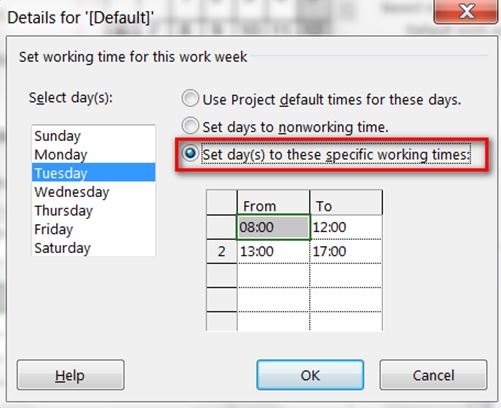
WORKINK CALANDER

עבור בחירה מרובה של ימים יש ללחוץ Ctrl על המקלדת, שנה את הזמנים ולאחר מכן, לחץ OK.
ג. עבור ימים שלא עובדים קבוע (כמו שבת) יש לבחור Set days to nonworking time .
הגדרת חגים, או מילואים וכד', יש לבחור בלשונית Exceptions, לתת שם למשל, חג פסח ולבחור תאריך עד תאריך בהם יש חופש, או חצי יום עבודה.
הגדרה נכונה של לוח השנה, בעלת חשיבות עצומה, מכיוון שאנו רוצים לראות את התמונה האמיתית של הפרויקט, ואם נשבץ משאב ביום שהוא "לא יום עבודה", אנו עלולים לחשוב שאנו עומדים בזמן, כשלמעשה אנו עשויים לאחר במסירת הפרויקט.
לצפיה בסרטון על: יצירת לוח שנה חדש לפרויקט.
בעבודה השוטפת אנו נבדוק שאכן המשימות במצב תזמון אוטומטי, במידה והן לא, מסתכלים על עמודת מצב פעילות Task Mode, כאשר פעילות בתזמון ידני יופיע סמל של נעץ, עם או בלי סימן שאלה:MANUALLY ICONMANUALLY ICON2 . ניתן לשנות את הפעילויות שמתוזמנות באופן ידני ע"י גרירה של הסמל AUTO ICON או ע"י סימון הפעילות, מלשונית Task, לחץ Auto Schedule :

AUTO SCHEDULED2

בדיקת סימני שאלה על ה Duration : יש לבדוק שאין סימני שאלה על ה Duration, כאשר ישנו סימן שאלה על עמודת ה Duration, בעצם הכוונה למשך משוער, נראה זאת בעמודת Estimated , יהיה מסומן ב- yes, ולכן על מנת לשנות את סימני השאלה, יש לפעיל מסנן על עמודת Estimated, ולשנות את ה Duration ע"י הזנת משכים ללא סימני שאלה.
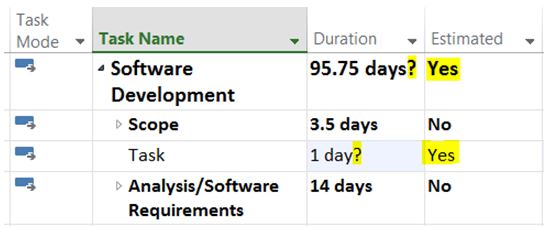
DURATION ESTIMATED

בדיקת פעילויות עוקבות: יש לבדוק ולוודא שלכל הפעילויות (למעט ערסלים ופעילות סיום הפרויקט) יש פעילויות עוקבות, בבדיקה זו יש להתייחס לאבני דרך ופעילויות. ויש לוודא שערסלים אינם מקושרים לפעילויות ולערסלים אחרים. פעולה זו היא בין החשובות, מכיוון שהיא מאפשרת לעלות על טעויות בקלות, ואם אין לכל הפעילויות פעילות עוקבת, הנתיב קריטי שהתוכנה תראה עלול להיות שגוי. לצורך הבדיקה יש לסנן לפי עמודה של פעילויות עוקבות- Predecessors.
עדכון קשרים: קיימים 4 סוגי קשרי גומלין בין פעילויות (תזמון משימות)-

1. Finish to Start (סיום-התחלה) - ניתן להתחיל פעילות רק לאחר סיום קודמתה.
2. Start to Start (התחלה-התחלה) - ניתן להתחיל פעילות רק לאחר תחילת קודמתה.
3. Finish to Finish (סיום-סיום) - לא ניתן לסיים פעילות לפני סיום קודמתה.
4. Start to Finish (התחלה-סיום) - לא ניתן לסיים פעילות לפני התחלת קודמתה.
Lag – השהייה חיובית מלאכותית בין שתי פעילויות בעלות קשר.
Lead – השהייה שלילית (חפיפה) מלאכותית בין שתי פעילויות בעלות קשר.

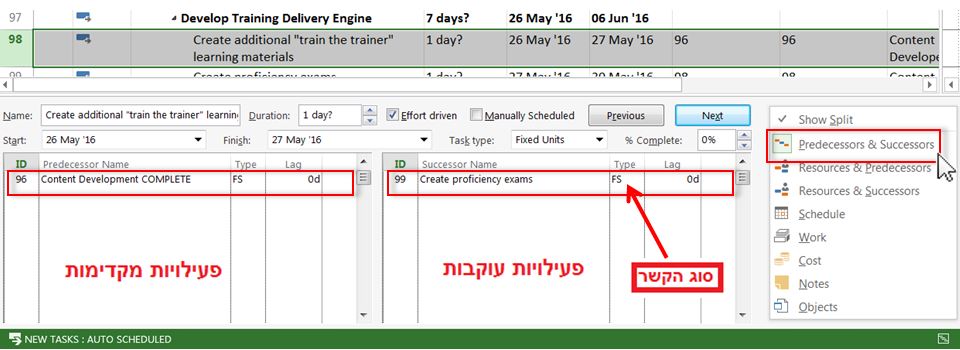
ניתן לפצל את המסך לשניים וזאת על מנת לאפשר עבודה קלה או יעילה יותר, ע"י עדכון הקשרים דרך מסך מפוצל בלשונית VIEW סמן וי VI על Details:

Predecessors Successors

יש ללחוץ על קליק ימניR CLICK , על המסך שהופיע למטה ולבחור Predecessors & Successors .
דרך נוספת לעדכן קשרים היא בעמודות פעילויות מקדימות ועוקבות ,Predecessors Successors.
ניתן להזין את ה- ID של הפעילות הקשורה ישירות לתא ה- Predecessors (קשרים מקדימים) של הפעילות השנייה, ברירת המחדל של המערכת אם לא מציינים את סוג הקשר הוא Finish to Start (סיום-התחלה) . לדוגמא, אם פעילות B באה רק לאחר שפעילות A מסתיימת, ניתן להזין את ערך ה-ID של פעילות A בעמודת ה- Predecessors של פעילות B:

UPDATE

 במידה ומעוניינים בסוג אחר שם קשר, מקלידים לאחר הזנת ID של הפעילות למשל 11FF, אז סוג הקשר הוא Finish to Finish (סיום-סיום). אם רוצים להוסיף השהיה, יש להוסיף בפלוס + או במינוס - , ולציין את יחידות הזמן, למשל 11FF-10 days, שהמשמעות שפעילות B מסיימת את פעילותה 10 ימים לפני סיום A.

להוסיף Project summery task, ולבצע בקרה בעזרתו :על תאריך מהעמודות Start ,Finish ו-Duration. ניתן להוסיפו בלשונית Format, לסמן וי VI ליד Project summery task.

בהצלחה!

כתבו:
דן ברזילי,MEng ,BSc ,PMP
מנכ"ל ומנהל פרויקטים

יוליה זוזוק, MBA, BSc


 *המאמר נכתב בלשון זכר מטעמי נוחות בלבד אך מיועד לנשים וגברים כאחד.


Article Module Menu Contact Field RokBox Image Page Break Read More RokGallery Status Category * Featured Access Language Tags Note Version Note MijoSEF Metadata Title Description Keywords Language Robots Googlebot Joomla! 3.10.12 — © 2026 P.M.Team | שרותי ניהול ותכנון פרוייקטים View Site0Visitors2Administrators0MessagesLog out Clean Cache


About Us

P.M. Team is an Israeli company providing project management solutions throughout the world. We are  specializing in project management and organizational consultation, including:

  • Project management and PMO services, from initiation and defining projects needs and requirements phases, through planning and tracking projects, relating to scope of work, schedule, budget, risks, human resources, to closure
  • Design and implementation of EPM systems
  • Analysis and improvement of project management processes and processes in general
  • Process improvements by implementation of tools and techniques according to the organization needs, re-organization and coaching by our certified coacher
  • Project management courses, including PMP® preparation courses, as well as management workshops

Read More

Project Management

What is project management? What is a project?

Project management is a branch of the management sciences, dealing with planning and tracking of
projects, while a project is a temporary endeavor undertaken to create a unique product, service or result !

A project must be defined with, at least, a scope of work (what is to be done?), a time frame
(When?) and a budget (How much shall it cost?).

Examples of projects, may be:

  • Development of a new product or service
  • Implementing a change to an organizational structure or method of work
  • Development, purchasing or implementing an information system

Read More

Courses & Workshops

P.M. Team Ltd offers a wide array of Project Management Courses, based on the PMBOK® guidelines, including basic and advanced project management courses, PMP® preparation courses for passing the Project Management Professional exam of the PMI® organization, trainings for managing projects with MS PROJECT, CLARIZEN, PRIMAVERA and more.

We also offer managerial trainings and courses such as conflict management, team management, negotiations skills, risk management,contract management, leadsership workshop, time management, team buildup and soft skills in general.

Our courses are offered as one on one trainings, private courses for organizations, after customizing them according to the customer's needs, or through registering to our public courses.

Read More

"Oh, The Places You'll Go !"
Dr. Seuss

Our clients

AFCON logo.jpg
Auto 3P Logo.png
BGU.jpg
Chemo Logo.gif
cocacolalogo.jpg
elmor.jpg
header_misrad_habitahon.jpg
Koor-Metals-LOGO-HEB.gif
Koor Metals-LOGO-ENG.gif
logoclarizen.jpg
logohafenix.jpg
logojb.jpg
logojj.jpg
logokibutzrevivim.jpg
logomalam.png
logo_inter_heb.jpg
micron.jpg
Mobileye.gif
NeoPharm_logo.jpg
netvision.jpg
omrix_ethicon.jpg
omrix_logo.jpg
RSA.jpg
siemens.jpg
StoreNext_Logo_2.png
tzahal.jpg
uno4web.jpg
WeSEE logo.png
yitlogo.jpg

Get Our Newsletter